










Google Workspace
- Our own workspace
- Lead alerts in Chat
- Read-only mailbox access
- Docs and Sheets for reports
Where our own work happens. Mail, calendar, Docs, Sheets and Chat share one login, and a new website enquiry lands in a Chat space the moment it's saved.
- 3alerts on every website lead: Chat, SMS and email
- ~3 minfor a bot to answer a post in our Chat bus (8 Oct 2026)
- ~405,000items on our shared drive before we cleared the code off it
- 1build on it
Why we run on it
One login for the day
Mail, calendar, Meet, Docs, Sheets and Chat sit under one domain and one set of permissions. Sharing a plan with a client is a link, not an attachment.
Lead alerts in Chat
A website enquiry posts to a Leads space in Chat as soon as it's saved, next to an SMS and an email, so nobody has to check a sheet.
Agents write where we read
Agents create and edit Docs and Sheets through a Google connection, so reports and plans land in the files the team already opens.
Meetings feed the CRM
Gmail and Calendar sync onto each person's timeline in Twenty. Fireflies joins our Meet calls, and a bot turns the transcript into tasks.
Read-only by default
Our mailbox connection is read-only and limited to named mailboxes. The Drive connection that searches and reads files is read-only too.
Drive for documents
The shared drive holds documents, exports and call notes. Code lives in GitHub, because a sync client and git don't mix.
We run the agency on Google Workspace. Gmail and Calendar for mail and meetings, Docs and Sheets for plans and reports, a shared drive for documents, and Google Chat for the team. Sheets has its own page, because so many of our reports and so much of our data live there. Tasks sit in Twenty, and code stays in GitHub, out of Drive.
Where a new enquiry shows up
Our contact and landing-page forms post to an n8n workflow. It saves the lead to a Sheet and to our CRM, answers the form, and then raises the alert. Newsletter sign-ups get a Sheet row and a list subscription, and no alert.
Each new lead triggers:
- A post in a Leads space in Google Chat.
- An SMS to the two founders.
- An email to our info inbox.
If part of the save fails, the form still goes through and a Chat post says which step failed. If your team lives in Slack instead, n8n can post the same alerts there.
Where the bots report
Our Grok Bot helpers post into Chat: meeting actions, site checks, release checks. One private space acts as the bus between the founders, the bots and our coding agents. A post wakes the bots at once, and a reply comes back in about three minutes (measured 8 October 2026). Chat is the live board. The record itself sits in the repo, the CRM or a pull request.
How our agents use Drive, Calendar and Gmail
- Drive: agents can search and read files, and create or edit Docs and Sheets, so reports land where the team already reads.
- Calendar: agents can read the founders' calendars to check availability and prepare for calls.
- Gmail: a separate connection reads the two founders' mailboxes and nothing else. It's read-only and limited to a short list of named mailboxes.
- Chat: history is copied to one machine for digests. Agents don't post to client spaces unless one of us asks them to.
What we connect it to
Docs and Chat hold the plan and the conversation, but they can't tell you whether the work paid off. That comes from the tracking and the CRM.
 Google SheetsHas its own page: our reports, data and form logs live in Sheets.
 Twenty CRMGmail and Calendar sync onto each person's timeline in the CRM.
 n8nPosts the lead alerts into a Google Chat space, or into a client's Slack.
 GrokThe bots report into a Google Chat space.
 FirefliesJoins Calendar and Meet calls to record and transcribe them.
 Google GeminiGoogle Meet can write call notes with Gemini.
- GoogleOur own mail, calendar, documents and chat.
 Cal.comCal.com checks your Google Calendar for clashes and can add a Meet link.
Where we've used Google Workspace


Services that use it
We don't sell it on its own. Each of these services uses it alongside the rest of your setup.
- Management, Support & ReportingWe keep improving your ads, website and reporting month after month, so your marketing doesn't stand still.Related tools: Webflow, Google Analytics 4 (GA4), Looker Studio, BigQueryHow it fits
- Place in the loop: AdsContent & SEOContent and SEO that get you found on Google by people already looking for what you do.Related tools: Google Search Console, Google Analytics 4 (GA4), Google, WebflowHow it fits



What Google Workspace is
Google Workspace is Google's business suite: Gmail, Calendar and Meet, Docs and Sheets, Drive and Chat, all under your own domain and one admin console. Plans are priced per user, so check Google's Workspace pricing page for what each tier includes.
Questions about Google Workspace
Straight answers on how we work, what it costs and what to expect. If yours isn't here, just ask.
Still have questions?
Talk to usHow do you plan and track client work?
We split each job into tasks, each with an owner and a date, on the task board in our CRM (Twenty). Code changes are tracked in GitHub as pull requests, and plans, notes and reports live in Google Docs and Sheets.
You don't need to log in to any of it. We keep you posted by email, on scheduled calls and in reports.
Can you send automation alerts into our Slack?
Yes. n8n can post an alert into a Slack channel: a new enquiry, a failed workflow, a form that didn't reach the CRM.
We keep alerts few and specific. Our own team gets them in Google Chat, by SMS and by email.
We've written about this
 How to make a free websiteYou can make a free website and own it. Here's how we built our own, pacing.agency, with AI coding tools and hosting that can cost nothing, step by step, and the parts that still cost money.Read the note
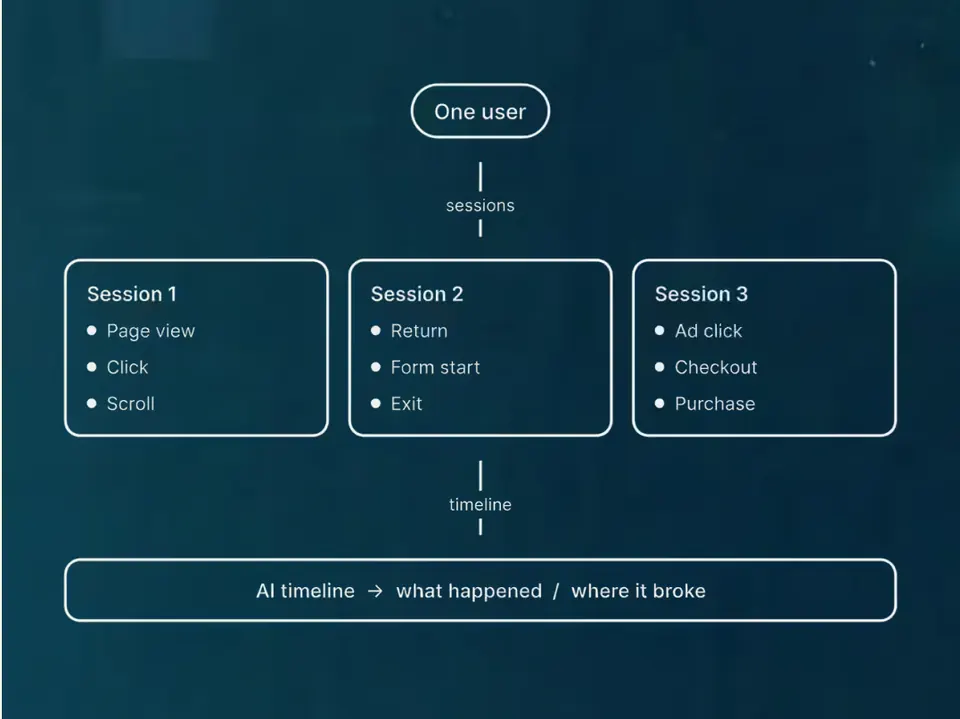
 The secret life of the user ID: what it is, why it matters, and when you can’t use itIf you're not using User IDs, do you really know what your website users are doing? Probably not.Read the note
.png) Why move your website from WordPress to Webflow?Migrations might be a pain, but longer term they're worth it.Read the note
Why move your website from WordPress to Webflow?Migrations might be a pain, but longer term they're worth it.Read the note
Start with your numbers.
We'll tell you which tools you need and which connections are missing.


















Bring your numbers.
We'll tell you if the spend makes sense.
- A 15-minute callYour goals, your challenges, and whether we're the right fit.
- A 1-hour discovery callWe dig into your numbers. Worth a hundred emails.
- A concrete planAds, a custom build or both, as a one-off project or ongoing.