










Where to start with AI when you have under 20 people
- Would it terrify you to know your competitor was answering every enquiry in minutes, at 3am, while yours wait until Monday?
- Would it terrify you to know your competitor had a month of content written before lunch?
- Would it terrify you to know your competitor could tell exactly which ads make money, and yours are still a guess?
You don't need a big project to catch up. You need two or three small things, set up properly. Here they are.
A government survey found 14% of micro businesses (fewer than 10 staff) were using AI. The most common barrier businesses cited, across all sizes, was that they hadn't identified a use for it (71%) (DSIT, fieldwork February to May 2025). So start with one job.
What companies your size are already doing
- Effort Days
Answer enquiries in minutes, 24/7
Every new enquiry gets a sensible first reply and goes straight into your CRM, and you get an alert with the details.
Stays human Anything that's a quote, a price or a promise, you write or approve yourself.
- Effort Hours to days
A month of content in a day
In one sitting you talk through your week, AI drafts a month of posts and emails, and you cut it down to what sounds like you.
Stays human You choose what to say and do the final read. Nothing goes out without you reading it.
- Effort Days to weeks (it starts with tracking)
Know which ads actually make money
Your ad spend is tied to real leads and sales, so you can see what paid for itself and stop what didn't.
Stays human You decide what to cut and what to spend more on.
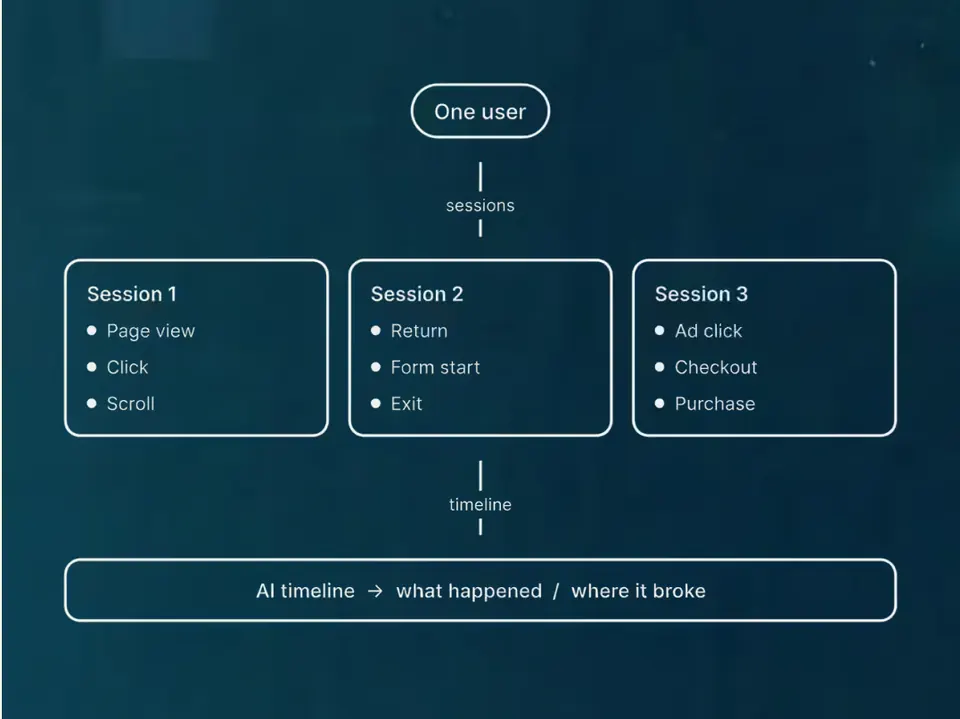
ProofAds priced against what a client is worthOne person's trail, not three GA4 users
- Effort Days
Build your own little tools
A quote calculator, a booking checker or a small internal app, made with Cursor or Claude Code, for the one job you keep doing by hand.
Stays human You decide what it should do and test it with real cases. We read every change before it runs.
Show 4 more
- Effort Hours
Voice note to a finished post or email
After a job you record two minutes on your phone, and AI turns it into a post, a case note or a customer email that sounds like you.
Stays human You say what actually happened and approve the wording.
- Effort Days
Quotes and invoices chased for you
Each week, overdue invoices and unanswered quotes get a polite reminder drafted for you. You send it or click approve.
Stays human You decide who gets chased and how firmly. Nothing's sent without you.
On our own work Our own rule: nothing gets sent unless a person asks.
- Effort Hours
Reviews asked for and answered
After each job, a short review request goes out, and replies to reviews are drafted for you to edit.
Stays human Anything about a complaint or a particular person, you write yourself.
- Effort Days
A weekly "is my site working?" check
An automatic check opens your forms, tests your tracking and tells you on Monday if a form or a tag has broken.
Stays human You fix it or ask someone to.
ProofTracking that proves a purchase Our Site Watch bot watches live sites for problems and files what it finds.
First step this month
Pick the one job that eats most of your evenings. For most small businesses, that's replying to enquiries. Write down the five questions you get asked most and your real answers, then set up one place where every enquiry lands (a form that feeds a simple CRM and sends you an alert). Don't add AI to the replies yet. Once every enquiry lands in one place, add a drafted first reply that you approve.
Not yet
- Don't buy five tools. Pick one general assistant and one automation tool.
- Don't let AI send anything to a customer before you've read it.
- Don't paste customer data into a free tool until you've read what it does with it.
Three questions for anyone who offers to help, us included
- What exactly will you do with my customers' data, and where does it go?
- Who checks the work before it reaches a customer, and how?
- If a tool you use changes or disappears, what do I still have?