









How to make a free website
You can make a free website and own it. Here's how we built our own, pacing.agency, with AI coding tools and hosting that can cost nothing, step by step, and the parts that still cost money.
 Ben PowerCo-founder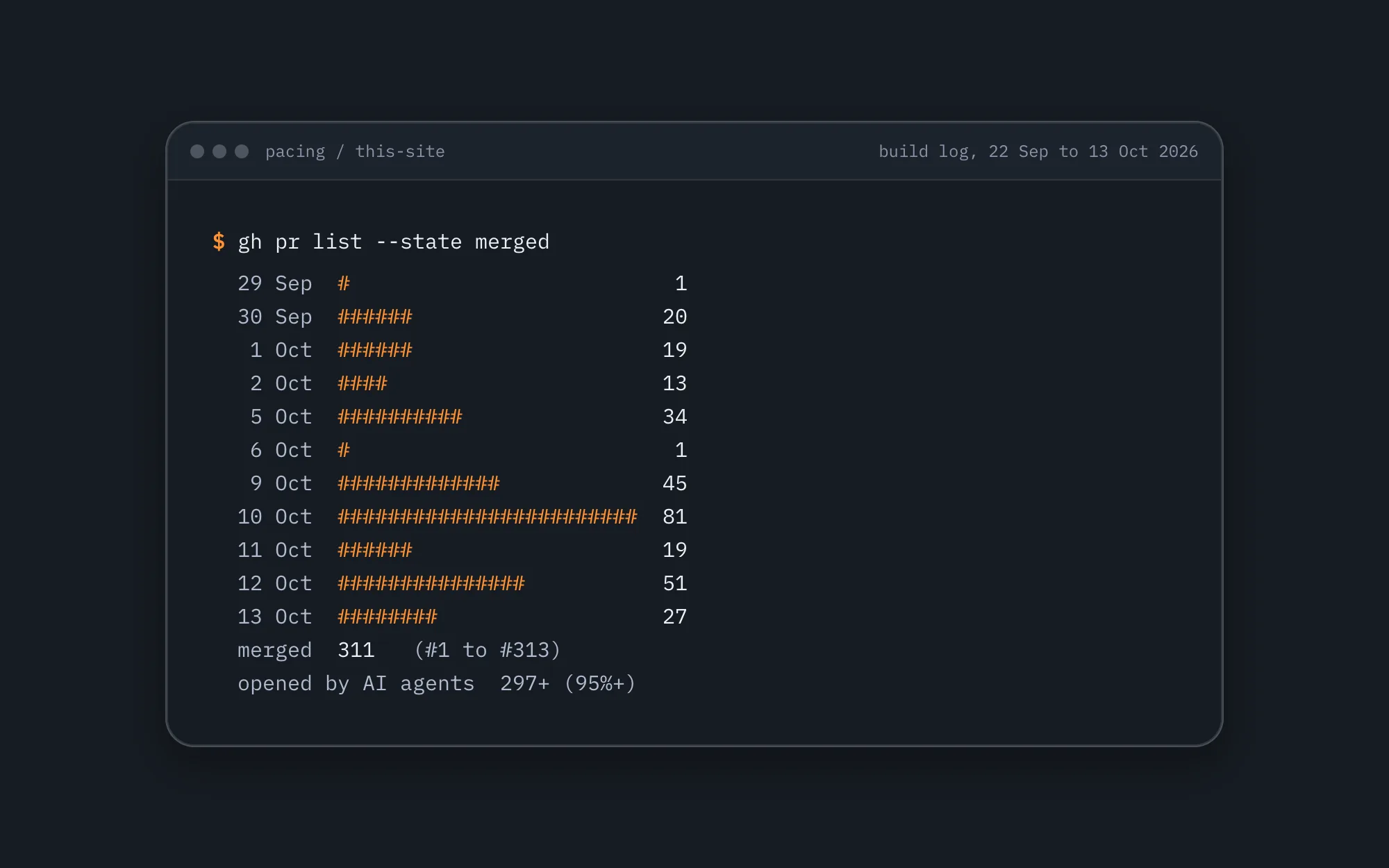
The short answer: yes, you can make a website for free, and you can own it rather than rent it. The hosting can cost nothing, and so can the software you build it with. A domain name of your own can't, and some of the extras a business site tends to want aren't free either. We rebuilt our own site, pacing.agency, this way in three weeks, so we'll use it as the example all the way through.
What a free website needs
Every website needs three things: somewhere to keep the pages (hosting), an address people type in (a domain), and the pages themselves. Hosting can be free. A domain of your own is a yearly fee, although free hosts give you an address on their own domain to start with. The pages are free if you build them yourself, and that's become far easier now that AI coding tools can write the code with you.
Three ways to make a free website
A free website builder
The quickest start: sign up, pick a template, type. Before you commit, check two things on the builder's pricing page: can you use your own domain on the free plan, and does the builder put its own branding on your pages? Those two are what usually push people onto a paid plan, so it's worth knowing before you've built anything.
A static site on free web hosting
Your pages are plain HTML files, built on your computer and uploaded to a host that serves files for free. Cloudflare is one: on its free plan, static files are served free and without a limit, as long as no code has to run first, and a small piece of code (a Worker) can handle up to 100,000 requests a day. You own the files, and you can move them to another host whenever you like.
Build it with AI, then host it free
This is the second way, with an AI agent doing the typing. You describe the page, the agent writes the code, and you check it in the browser and ask for changes. It's how we rebuilt our own site, and it's what the rest of this post walks through. The AI tools themselves are paid subscriptions; the site they build doesn't have to cost anything to host.
How to make a free website, step by step
This is how we made ours. It's one site, our own, so treat it as one worked example rather than the only way to do it.
- Pick a framework that builds plain pages. We used Astro, which is free and open source. You write pages as components and content files, and it turns them into plain HTML, so most visits don't need any code to run on the server.
- Keep the content in files, in GitHub. Every page, post and FAQ on our site is a small file in a GitHub repository. That gives you a history of every change, and an undo, for free.
- Add an editor if someone else edits. People who don't code edit our site in Keystatic, a free, open-source editor that saves each change to GitHub. You fill in fields and put blocks in order, then click Save.
- Let an AI agent write the code, and check what it writes. We used Claude Code and Cursor. AI agents opened at least 297 of the 311 pull requests (proposed changes) that built the site, 95% of them. We decided what the site says, checked the pages and chose when it went live.
- Deploy to Cloudflare. One Cloudflare Worker serves the site. Every change merged on GitHub rebuilds the site and deploys it in a minute or two.
- Point your domain at it. Our domain's DNS is on Cloudflare's free plan too.
- Keep images somewhere free. Ours are in Cloudflare R2, whose free tier includes 10 GB of storage and doesn't charge for the traffic.
The whole move took us three weeks, from the first commit on 22 September 2026 to going live on 13 October 2026, with two of us making the decisions. You can watch the build log on the build page.
How to host a website for free
Cloudflare's free plan is what makes the hosting free. The parts that matter (checked on 13 October 2026):
- Static files are free and unlimited, as long as no code runs before they're served.
- A Worker gets 100,000 requests a day, with up to 10 milliseconds of processing each. That's the code that handles things like a contact form or redirects. On the day we went live, the median request to ours used 0.4 milliseconds.
- Images and files in R2: 10 GB of storage on the free tier, and no charge for the traffic.
- DNS for your domain is free.
So keep pages static wherever you can, and only run code where you need it. A site like ours can fit the free plan that way. We happen to pay for Cloudflare's Workers Paid plan, $5 a month, because the same account hosts our other projects, and on our site the Worker only runs for page requests (it handles redirects and a few checks), while images, styles, scripts and fonts are served as static files that skip it. On the free plan, you'd set the Worker to run only on the addresses that need it.
Can you get a free domain?
Not one of your own. A free host gives you an address on its domain (on Cloudflare, one ending in workers.dev), which is fine for trying things out. For a business, buy your own domain. It's a yearly fee, whichever way you build the site.
What still costs money
Here's everything our site runs on, and what each costs us:
- Hosting: Cloudflare. A site like ours can run on the free plan; we pay $5 a month for Workers Paid because the account hosts other projects too.
- Code and history: GitHub, on its free plan. The deploys run on GitHub Actions, which comes with a free monthly allowance of minutes.
- The editor: Keystatic, free and open source.
- Site search: Algolia, on its free tier.
- The booking calendar: Cal.com, on its free tier.
- Cookie consent and the legal pages: Termly, on our agency's paid account at about £5 a month. You don't need Termly: any consent tool does the job.
- The domain: a yearly fee.
- The AI tools we built it with: paid subscriptions.
- Your time, or someone else's. Free hosting doesn't write the copy or check the pages.
So how much does a website cost if the hosting's free? For a site like ours, the running costs can come down to a domain and a consent tool. The bigger cost is time: building it, and keeping it right.
When a free website isn't the right call
If your team wants to redesign pages in the browser without a developer, a visual website builder is the better fit, and paying for one is worth it. We're a Webflow Certified Partner, and we pick the platform for the site, not the other way round. If you'd like a hand choosing, or building it, talk to us about your website.
Our site in numbers
- 21 days from the first commit to going live.
- 311 pull requests merged, 81 of them on the busiest day.
- At least 297 of them (95%) opened by AI agents.
- At least 438 AI agent sessions, 375 of them started by another agent.
- At least 338 prompts typed by a person.
- Over 3.3 billion tokens through the AI models, most of it the agents re-reading the code as they worked.
How we counted each one is on the build page.
Tools referenced
 CloudflareSits in front of our sites and tools: DNS and caching, Workers, R2 storage, Access, Turnstile and Pages.Tech
 Astro + KeystaticThe site you're reading is built with Astro and edited in Keystatic. Pages go out as plain, fast HTML, every edit is saved in Git, and when we need something custom we write it into the same project.Tech
 GitHubWhere our code lives. Code changes are pull requests that are read first, and CMS edits are commits that run checks before they deploy.Tech
 Claude CodeThe AI we trust most to change our code. It plans the work, builds the hard parts, briefs Cursor's agents on the rest and reviews what comes back. A person decides what goes live.Tech
 CursorThe editor we build in and the best place we've found to run Claude Code. Its own agents take the clear-cut coding jobs, on models that come with the plan.Tech
 Cal.comThe calendar behind the Book a call buttons on this site. You pick a time in a pop-up without leaving the page, and the booking carries your visitor ID, so we can match it to the visit that brought you in.CRM
 WebflowWe're a Webflow Certified Partner. Your team can edit the pages without a developer, and the tracking and forms are wired in before launch.Tech

More from the Content Hub
.png) Why move your website from WordPress to Webflow?Migrations might be a pain, but longer term they're worth it.Read the note
Why move your website from WordPress to Webflow?Migrations might be a pain, but longer term they're worth it.Read the note The secret life of the user ID: what it is, why it matters, and when you can’t use itIf you're not using User IDs, do you really know what your website users are doing? Probably not.Read the note
 How we built 136 FAQs in minutes: the power of Cursor + Webflow MCPHow Cursor and Webflow's MCP server helped us create 136 FAQs for our website in minutes, and what we did first to make it work.Read the note
Get the next one in your inbox.
Occasional emails, only when there's something worth reading. You can unsubscribe from any of them.
Ready to get started?
Book in a free video call, a meeting in and around London, or even a running or climbing session.
- A 15-minute callYour goals, your challenges, and whether we're the right fit.
- A 1-hour discovery callWe dig into your numbers. Worth a hundred emails.
- A concrete planAds, a custom build or both, as a one-off project or ongoing.