










Google Cloud
- Cloud Run
- BigQuery
- EU region
- Scales to zero
Cloud Run hosts the web tools we've built: three journey analysers, which read their data from BigQuery, and the TechStack Analyser, which doesn't need it. There's no server for us to look after.

- 4of our tools run on Cloud Run: three journey analysers and the TechStack Analyser
- 7,000+technologies the TechStack Analyser can spot
- 2builds on it
- 1service it belongs to
Why Cloud Run for these tools
Quiet stays cheap
Cloud Run's default is no running instances, and under its standard billing you aren't charged for idle time. Requests, traffic and BigQuery use still meter, so it suits a tool used a few times a week.
Client data kept apart
Each client's event data sits in its own Google Cloud project, and sign-in and settings decide who sees which one.
Push and it's live
The two bigger journey analysers were set up to deploy when we push to the main branch. Nobody logs in to a server to update them.
Roles, not shared logins
Access is granted per person, with a role for what they need. Reporting access doesn't come with the keys to everything else.
Data sits next door
The journey analysers read BigQuery in Google Cloud. The simple one finds a visitor's days first and reads only those, so a lookup costs megabytes.
A login in front
Most of our Cloud Run tools sit behind Cloudflare Access, so only people we've let in reach them, and our n8n workflows use a service token.
Google Cloud is where our web tools run. Google looks after the servers, so there's no machine of ours to patch. We use two parts of it: Cloud Run to host the tools, and BigQuery to hold the data the journey analysers read.
What runs on Cloud Run
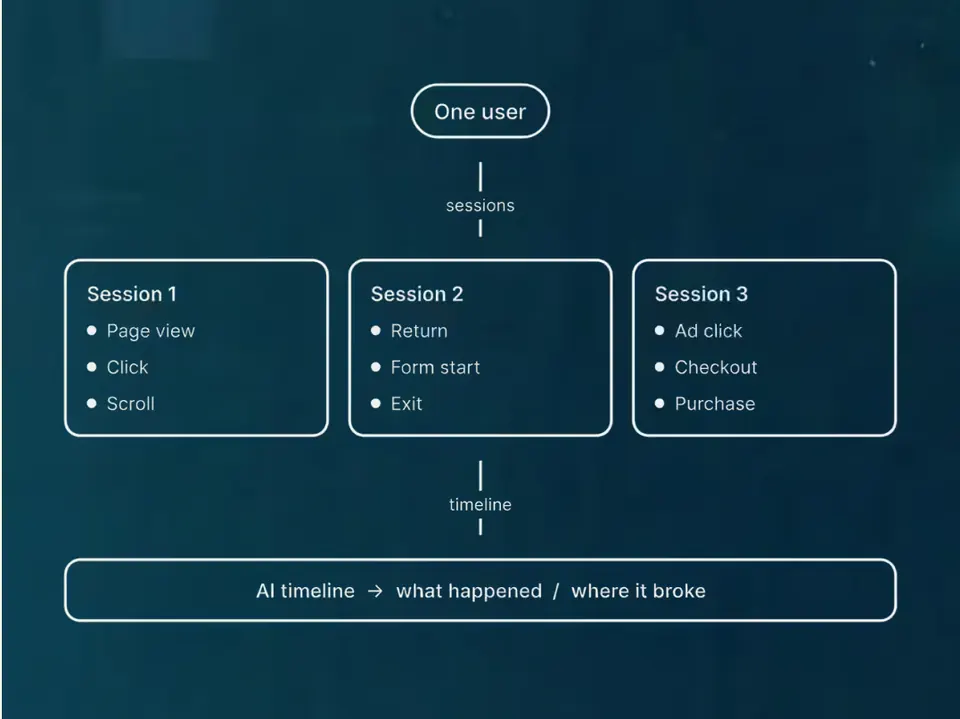
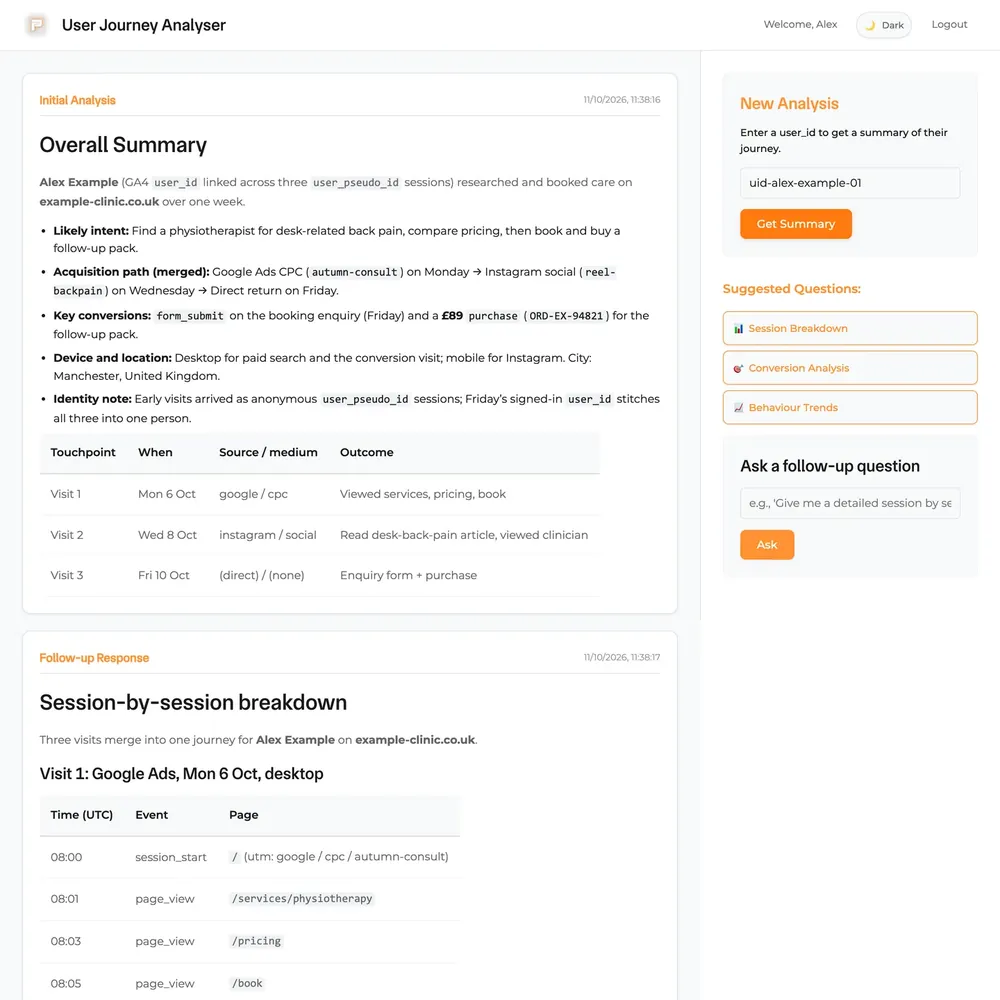
- Three journey analysers. Give one a visitor's ID and it shows the trail that visitor left. Pacing Journey is the simple version. The bigger ones add shop or CRM data and write summaries on top.
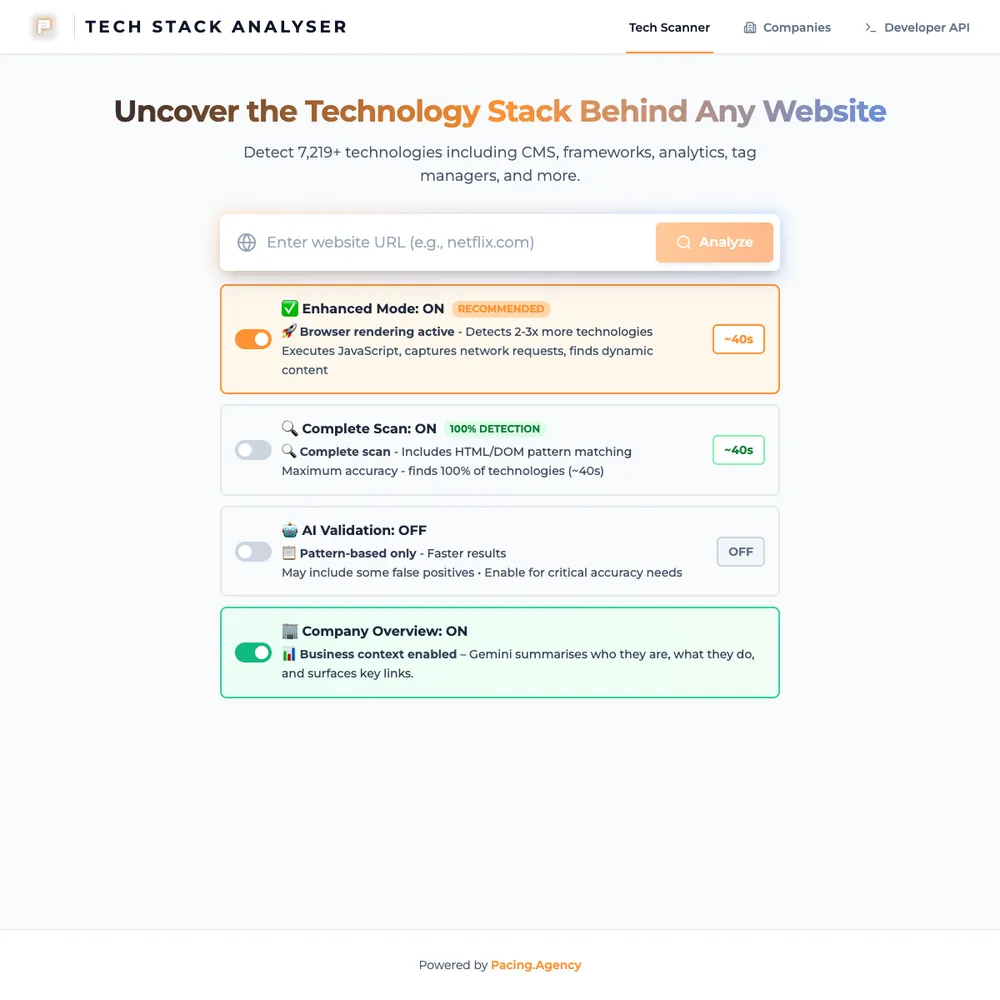
- The TechStack Analyser. We scan a prospect's site before a pitch and get back the technologies it runs on, with a confidence score. It doesn't use BigQuery. It's behind a Cloudflare login, and our n8n workflows call the same API.
How it's set up
- Client data in its own project. Each client's event data sits in a Google Cloud project of its own. Who sees what is decided by sign-in and settings.
- Europe for the apps. Cloud Run runs in Google's
europe-west1region. Each BigQuery dataset sits where that client's data export was set up, which isn't always Europe. - A login in front. Most of our tools sit behind Cloudflare Access. The rest have their own sign-in.
- Access by role. People get one account at a time, with the roles they need and nothing more. A contractor who needs to read reports gets BigQuery access, not the keys to everything else.
- Deploys. The two bigger journey analysers were set up to deploy when we push to the main branch. The TechStack Analyser and the simple journey tool go out by a deploy script, when we choose.
Why BigQuery sits next to it
The journey analysers read from BigQuery. The simple one looks up the days a visitor appears on first and then reads only those days, so a lookup costs megabytes, not the whole export. If BigQuery has no row for that ID, the tool says so rather than guessing.
Where it doesn't fit
The tools we run around the clock, like our CRM, n8n and email platform (Twenty, n8n and Notifuse), are on Hetzner servers instead. Cloud Run suits things that are used now and then.
Where should it run?
Cloud Run and a rented server both work. The difference is how the tool gets used. Pick what yours does and we'll tell you where we'd put it.
Used now and then
| What matters | Google CloudOur pick |  Hetzner Hetzner |
|---|---|---|
| Quiet moments | Can scale to zero, so you aren't billed while it's idle | You pay for the server either way |
| Busy moments | Adds copies automatically as requests arrive | You size the server for the peak, by hand |
| Deploying | Push a container image and it runs | Docker and your own scripts |
| Access | A role for each person in Google Cloud IAM | Whoever has the server login |
| Extras | BigQuery, databases and AI models ready to plug in | You install them yourself |
Our pick: Google Cloud. A tool that gets used a few times a week shouldn't cost the same as one that's busy all day. Cloud Run starts when a request arrives and goes quiet when it ends, which is why our TechStack Analyser lives there.
Runs all day
| What matters | Google Cloud | HetznerOur pick |
|---|---|---|
| How you pay | Compute, storage and network, each metered and priced separately | An hourly rate with a monthly cap for each server |
| A month that never sleeps | Depends on usage, so you estimate it with their calculator | Costs the cap, the same every month |
| Traffic | Data leaving their network is charged by the gigabyte, after a free allowance | An allowance with each server, and only outgoing traffic counts |
| Keeping it warm | Possible, but warm copies are billed | It's always on |
| Who looks after the machine | Google for the platform, you for the container | You, or us |
Our pick: Hetzner. A CRM or n8n is never idle, so a capped monthly price is easier to plan than metered compute. That's why we run Twenty, n8n and Notifuse there.
Cloud Run's and BigQuery's facts are from Google's docs, October 2026, and Hetzner's from its own docs. Prices change, so we've kept their numbers out. The tools and regions are from our own repos, 10 October 2026.
What we connect it to
A journey analyser can only show what the tracking already stored. If the ID was never saved, it comes back empty.
 BigQueryStores the events the journey analysers read.
 PlaywrightRuns inside the TechStack Analyser to render pages.
 Google GeminiAn optional step in the TechStack Analyser.
 CloudflareAccess puts a login in front of these services.
- HetznerThe do-it-yourself option: a plain server we look after.
 GoogleOne of the Google products we use. It hosts the small tracking and reporting services we run.
It's one part of the setup.
If another part is broken, this one wastes money.
What's a customer worth?
- 1
- 2
- 3
- 4




Services that use it
We don't sell it on its own. Each of these services uses it alongside the rest of your setup.


What Google Cloud is
Google Cloud is Google's cloud platform, with hundreds of services. We use two. Cloud Run takes a container and runs it as a web service, starting and stopping copies as requests come in. BigQuery is Google's data warehouse, where you query large tables with SQL.
On Cloud Run the default is no copies kept running, and under its standard billing you aren't billed while an instance is idle. You can keep copies warm for instant starts, but those are billed. BigQuery has a monthly free allowance of 1 TiB of queries and bills beyond that by the data a query reads.
Start with your numbers.
We'll tell you which tools you need and which connections are missing.


















Bring your numbers.
We'll tell you if the spend makes sense.
- A 15-minute callYour goals, your challenges, and whether we're the right fit.
- A 1-hour discovery callWe dig into your numbers. Worth a hundred emails.
- A concrete planAds, a custom build or both, as a one-off project or ongoing.