










Playwright
- Real browser
- Chromium, Firefox, WebKit
- Open source
- TechStack Analyser
Playwright drives a real browser from code. It renders pages for the TechStack Analyser and screenshots and checks our own site builds, so we see what a visitor sees.

- 324live pages checked, 30 Sept 2026
- 7,000+definitions in the analyser, Dec 2025
- 1440 + 390widths we screenshot at
- 1build on it
What a real browser shows us
Pages as they run
Playwright loads the page in Chromium and lets its scripts run, so tools that only appear after load show up in a TechStack Analyser scan.
Requests and variables
In browser mode the analyser also records the fetch and XHR requests and the JavaScript variables a page sets, and matches them to its definitions.
Every block, two sizes
Our block check screenshots each block at 1440 and 390 pixels wide, and flags console errors and sideways scrolling.
Old site against new
Our layout check loads the live pacing.agency page next to our build and compares height and section positions. 324 URLs on 30 September 2026.
Smoke tests on deploy
A Playwright crawl we built runs against staging after each push and daily on the live site, failing on page errors and broken requests, ignoring missing images and fonts.
Open source, one API
Free under Apache 2.0, from Microsoft. One API drives Chromium, Firefox and WebKit. We use Chromium from JavaScript and Python.
We use Playwright to look at pages the way a visitor's browser does. It's behind two things: the scans in our TechStack Analyser, and the checks we run on our own website builds.
In the TechStack Analyser
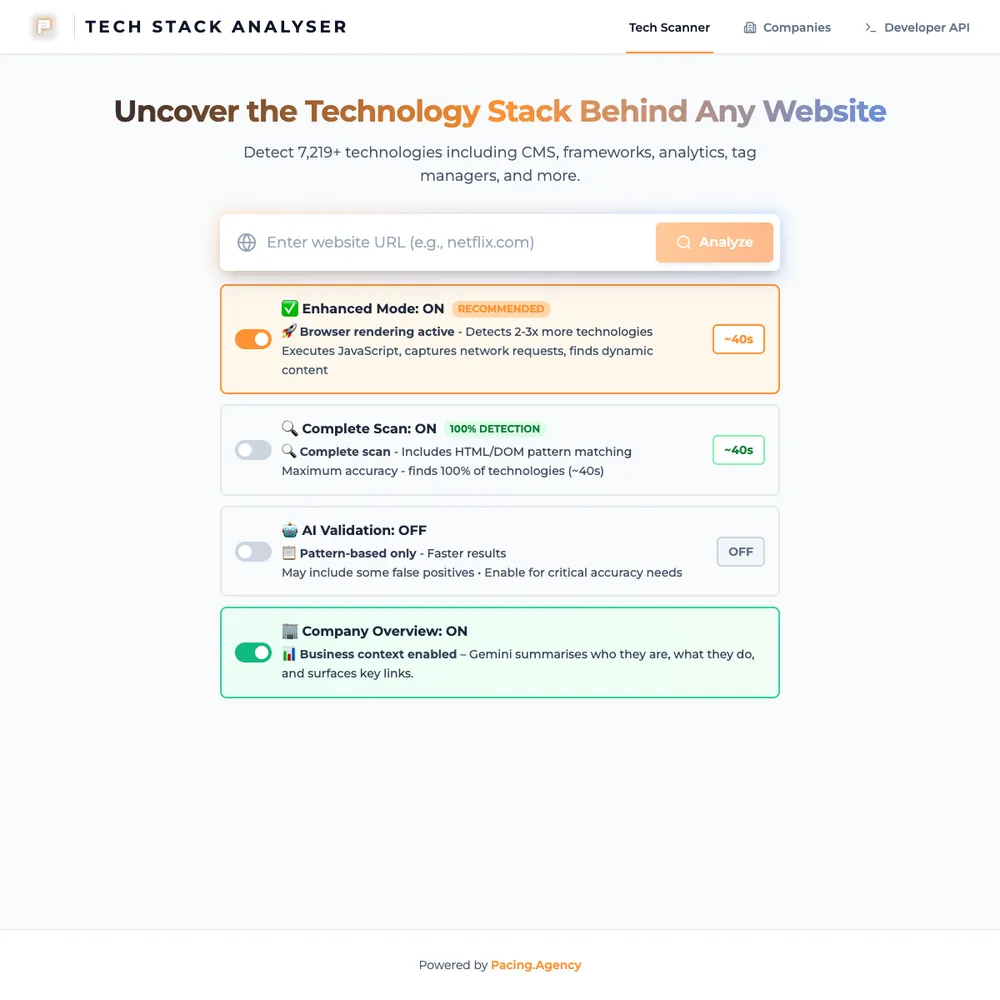
- A normal scan fetches a page's HTML and matches it against 7,000+ technology definitions (Dec 2025 count).
- Browser mode is an option on each scan. It loads the page in Chromium, lets the scripts run, and also records the fetch and XHR requests and the JavaScript variables the page sets. Tools that only appear once the page runs get picked up that way.
- It runs in the analyser's container on Google Cloud Run. See the TechStack Analyser build.
On this website
We rebuilt this site on Astro, and three of our own checks use Playwright:
- Block check. Scrolls each redesigned page at 1440 and 390 pixels wide, screenshots every block, and flags console errors and sideways scrolling. We run it before a block or page change goes in, then look at the screenshots.
- Layout parity. Loads the live pacing.agency page and our build for each URL, at both widths, and compares the page height and where each section sits. The last full run, on 30 September 2026, covered 324 URLs.
- Landing-page shell review. Loads each landing page on the live site and on our build side by side, notes whether each shows the nav and footer, and saves a screenshot of both, so we can match what's live.
Claude Code takes its own Playwright screenshots of the pages it changes, at desktop and phone width, before a person sees them.
Smoke tests on deploy
We've built a Playwright crawl for a Next.js site that runs against staging after each push to the main branch, and once a day against the live site. It loads the key pages and fails on page errors or failed requests for HTML, scripts, styles or the API, ignoring missing images and fonts.
What we connect it to
It only sees what a browser sees. A page that hides things behind a click, a sign-in or a cookie banner can still slip past, and a site that blocks bots can turn a scan away. A passing run isn't a design review either: we still look at the screenshots.







Services that use it
We don't sell it on its own. Each of these services uses it alongside the rest of your setup.


What Playwright is
Playwright is an open-source tool from Microsoft that controls a real browser from code. One API drives Chromium, Firefox and WebKit, and it's available for TypeScript, Python, .NET and Java. It's released under the Apache 2.0 licence.
It waits for a page's elements to be ready before it clicks or reads them, can record a full trace of a run, and runs tests in parallel. That makes it as useful for checking a website as for scraping one.
Start with your numbers.
We'll tell you which tools you need and which connections are missing.


















Bring your numbers.
We'll tell you if the spend makes sense.
- A 15-minute callYour goals, your challenges, and whether we're the right fit.
- A 1-hour discovery callWe dig into your numbers. Worth a hundred emails.
- A concrete planAds, a custom build or both, as a one-off project or ongoing.