










Salesforce
- Works with what you have
- Ads tied to pipeline
- A way off, if you want one
We work with the Salesforce you have, get marketing the numbers it needs, and help you move off it if that's the plan.
- 3xmore leads reconciled to paid, HubSpot to Salesforce
- 18%lower cost per lead from the same work
- 2CRMs joined up: HubSpot and Salesforce
What it does well
The pipeline of record
Leads, accounts and opportunities in one place. We treat it as the scoreboard, and judge ad results against it.
Campaigns on the deal
Salesforce campaigns can be linked to leads and opportunities, so a deal can point back to the campaign behind it. Which campaign features you get depends on your edition.
Permissions that scale
Roles, sharing rules, territories and single sign-on, so a big team can control who sees what.
Forecasts and quotas
Forecasting, quotas and deep reporting for sales managers, depending on edition.
A huge add-on market
AppExchange is a big marketplace of add-ons, for the jobs Salesforce doesn't do out of the box.
People you can hire
There are lots of certified admins and consultants, so you're never stuck for help.
A lot of large businesses have run Salesforce for years. It has grown custom fields, add-ons and processes nobody fully remembers, and marketing struggles to get a straight answer out of it. We don't ask you to rip it out. We work with what's there and get marketing the numbers it needs.
What we do
- Keep each lead's source. Every lead arrives in Salesforce with the ad and campaign it came from. That's our tracking work, joined to your CRM.
- Judge ads by pipeline. Salesforce stays the scoreboard: ads are judged by the opportunities and sales in it, not by the ad platforms' own numbers.
- Simplify what marketing needs. A short list of fields, campaigns that match the ads, and one report that marketing and sales both trust. Your admin keeps control of the org.
- Put a simpler tool in front where it helps. HubSpot can run forms and email in front of Salesforce, so marketing isn't waiting on admin changes.
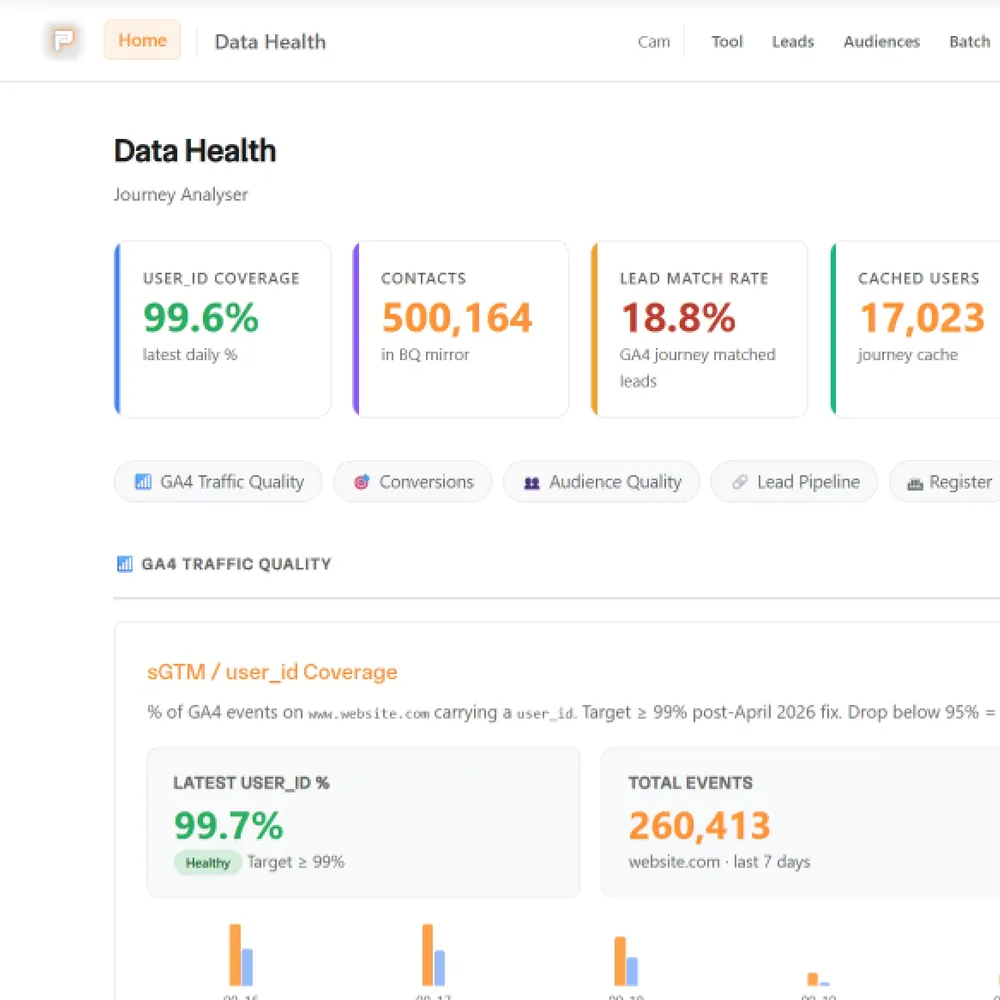
Done this way: 3x more leads reconciled to paid and 18% lower cost per lead. Read the case study.
If you want to move off it
Some teams pay for far more Salesforce than they use. We'll help you work out what you actually need and plan a move to something simpler, such as HubSpot or Pacing CRM, keeping your history and your lead sources.
What we need from you
- A Salesforce admin who owns the org and can approve changes to lead and campaign fields.
- A report with each opportunity's source, campaign, stage and dates, with no row cap, so we can match it to the ads.
Is Salesforce the right CRM?
If you're already on it, we'll work with it. If you're choosing, pick who'll use it and we'll tell you what we'd set up.
Sales already runs on Salesforce
| What matters | Salesforce |  HubSpotOur pick |
|---|---|---|
| What it does best | Forecasts, quotas and deep sales reporting | Forms, email, landing pages and ad audiences |
| Lead source | Only as good as what reaches it | Kept from the first ad click, on the contact record |
| Who sets it up | Your Salesforce admin | Us, in your own portal |
| What you pay for | A licence for each user, priced by edition | Seats, with a free plan for up to 2 users |
Our pick: HubSpot in front of Salesforce. Your sales team keeps Salesforce. HubSpot runs the forms, emails and ad audiences, and passes each lead's source from the ad click into Salesforce campaigns.
Marketing and sales together
| What matters | Salesforce | HubSpotOur pick |
|---|---|---|
| Email, forms and landing pages | Come from separate marketing products | Built in, on the same contact record |
| Ad platforms | Joined up through add-ons or custom work | Connects to Google, Meta and LinkedIn ads |
| Sales tools | Pipeline, forecasts, quotas | Pipelines, with sequences on Sales Hub Professional and Enterprise and forecasts on Professional |
| Getting started | Usually set up by an admin or consultant | A free plan for up to 2 users, then paid seats |
| What you pay for | A licence for each user, priced by edition | Seats, with the free plan to start |
Our pick: HubSpot, if you're choosing fresh and want email, forms, ads and deals on one contact record. We set it up in your own portal, and we can join it to Salesforce later if you grow into it.
A small team
| What matters | Salesforce |  Twentyself-hostedOur pick |
|---|---|---|
| Adding a colleague | Another licence | Costs nothing |
| What you pay for | A licence for each user, priced by edition | One server, however many people use it |
| Your own kinds of record | Custom objects and fields, set up by your admin | Custom objects with their own fields, views and API |
| Where your data lives | Salesforce's cloud | A database on your own server |
| Who looks after it | Salesforce hosts it; your admin configures it | You, or us: updates and backups |
Our pick: Twenty, if you're a handful of people who need contacts, deals and tasks in one place. It's what we run ourselves, and adding a person costs nothing.
Funnels, texts and booking in one
| What matters | Salesforce | GoHighLevel |
|---|---|---|
| Built for | Large sales teams: forecasts, quotas, territories | Small businesses and agencies: funnels, booking and follow-up |
| Landing pages and funnels | Separate products or add-ons | A website and funnel builder built in |
| Booking | Add-ons or AppExchange apps | Booking calendars built in |
| Texts and calls | Add-ons | Email, SMS and calling built in, charged by use |
| What you pay for | A licence for each user, priced by edition | A monthly plan with unlimited users |
Our pick: Not Salesforce. GoHighLevel puts landing pages, booking, texts and calls in one plan. We'd build it on Twenty with n8n instead, the way we run our own lead follow-up, so you own the data and each part.
Salesforce's facts are from its Sales pricing page and Twenty's from the install we run, 10 October 2026. HubSpot's are from its Sales Hub pricing page, and GoHighLevel's from its pricing page, 16 October 2026. Prices change, so we've kept them out.
What we connect it to
Salesforce records the pipeline, but it can only credit an ad if the lead's source survives the trip in. Our tracking work makes sure it does.

It's one part of the setup.
If another part is broken, this one wastes money.
What's a customer worth?
- 1
- 2
- 3
- 4
Where we've used Salesforce



What Salesforce is
Salesforce is a CRM platform for larger sales teams. It holds leads, accounts, contacts and opportunities, and its Sales Cloud products add pipeline management, forecasting and reporting. It's licensed per user, by edition (Salesforce's Sales pricing page, October 2026).
Plenty of established businesses have run it for years, with their own admins and add-ons built around it. That's why we work with what's there instead of starting again.
Questions about Salesforce
Straight answers on how we work, what it costs and what to expect. If yours isn't here, just ask.
Still have questions?
Talk to usCan you work with our existing Salesforce?
Yes. We don't replace it or build orgs. We work with the data around it: the click ID and UTM tags are captured at the form and carried into the CRM that takes the lead, so reports can say which ads reached the pipeline.
Changes to Salesforce fields need your Salesforce admin. We've worked with a setup where HubSpot sits in front, passing the click ID and campaign across to Salesforce.
Why do my leads lose their source in Salesforce?
Usually because something overwrites it on the way in: a form that doesn't pass the campaign, a chatbot, an import, or a duplicate record. The ad then looks worse than it is.
It's a wiring job. We keep the click ID and campaign tags with the lead from the form to the CRM, so the source survives.
Start with your numbers.
We'll tell you which tools you need and which connections are missing.
















Bring your numbers.
We'll tell you if the spend makes sense.
- A 15-minute callYour goals, your challenges, and whether we're the right fit.
- A 1-hour discovery callWe dig into your numbers. Worth a hundred emails.
- A concrete planAds, a custom build or both, as a one-off project or ongoing.